This is a stopwatch app with a lap counter and a list of lap times.
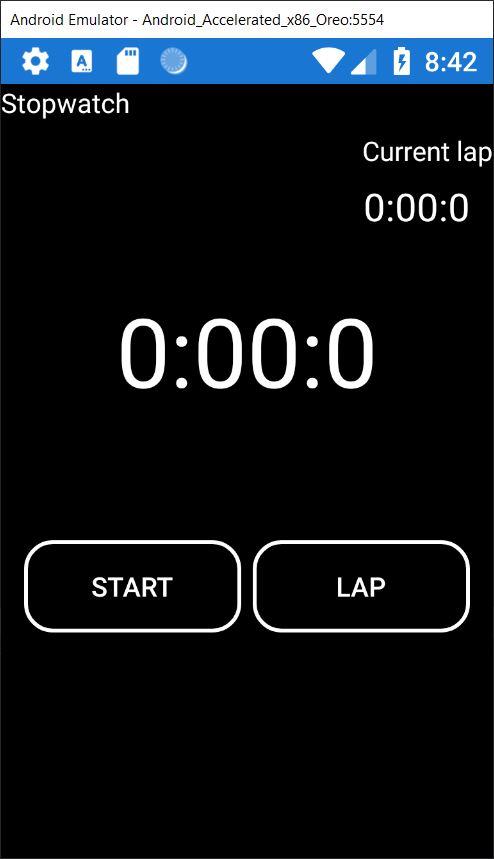
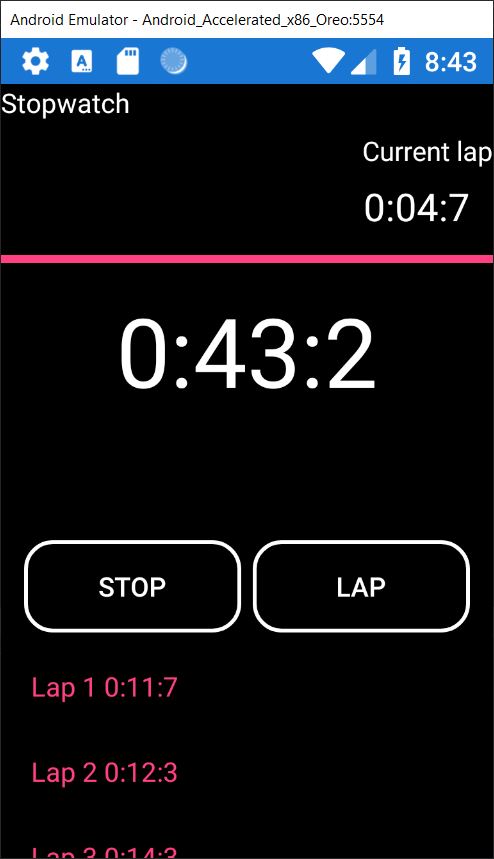
Had to learn alot about layouts in xaml to get this one looking similar to the one from the book, which was fun.
MainPage.xaml
<?xml version="1.0" encoding="utf-8" ?>
<ContentPage xmlns="http://xamarin.com/schemas/2014/forms"
             xmlns:x="http://schemas.microsoft.com/winfx/2009/xaml"
             x:Class="Stopwatch.MainPage"
             BackgroundColor="Black">

    <ContentPage.Resources>
        <ResourceDictionary>
            <Style x:Key="BlackButtonStyle" TargetType="Button">
                <Setter Property="TextColor"
                        Value="White" />
                <Setter Property="BackgroundColor"
                        Value="Black" />
                <Setter Property="CornerRadius"
                        Value="15" />
                <Setter Property="BorderColor"
                        Value="White"/>
                <Setter Property="BorderWidth" Value="2" />
            </Style>
        </ResourceDictionary>
    </ContentPage.Resources>

    <Grid>
        <Grid.RowDefinitions>
            <RowDefinition Height="Auto"/>
            <RowDefinition Height="Auto"/>
            <RowDefinition Height="Auto"/>
            <RowDefinition Height="4*"/>
            <RowDefinition Height="Auto"/>
            <RowDefinition Height="3*"/>
        </Grid.RowDefinitions>

        <Grid.ColumnDefinitions>
            <ColumnDefinition/>
            <ColumnDefinition/>
        </Grid.ColumnDefinitions>

        <Label Text="Stopwatch" Grid.Row="0" Grid.ColumnSpan="2"
               HorizontalTextAlignment="Start" TextColor="White" />
        <Label Grid.Row="1" Grid.ColumnSpan="2" Grid.Column="0"
               HorizontalTextAlignment="End" Text="Current lap" TextColor="White" />
        <Label x:Name="CurrentLapTimeDisplay" Grid.Row="2" Grid.ColumnSpan="2"
               Grid.Column="0" FontSize="20" HorizontalTextAlignment="End"
               Margin="0,0,12,0" Text="0:00:0" TextColor="White" />

        <StackLayout Grid.Row="3" Grid.ColumnSpan="2" Grid.Column="0" >
            <ProgressBar x:Name="LapProgressBar" ></ProgressBar>
            <Label x:Name="TotalTimeDisplay" HorizontalTextAlignment="Center" FontSize="50"
                   Text="0:00:0" TextColor="White"></Label>
        </StackLayout>


        <Button x:Name="StartButton" Grid.Row="4" Grid.Column="0" Text="start" Margin="12,0,0,0"
                Clicked="StartButton_OnClicked"
                Style="{StaticResource BlackButtonStyle}" />
        <Button x:Name="StopButton" Grid.Row="4" Grid.Column="0" Text="stop"  IsVisible="False" Margin="12,0,0,0"
                Clicked="StopButton_OnClicked"
                Style="{StaticResource BlackButtonStyle}" />
        <Button x:Name="ResetButton" Grid.Row="4" Grid.Column="1" Text="reset"  IsVisible="False" Margin="0,0,12,0"
                Clicked="ResetButton_OnClicked"
                Style="{StaticResource BlackButtonStyle}" />
        <Button x:Name="LapButton" Grid.Row="4" Grid.Column="1" Text="lap" Margin="0,0,12,0" Clicked="LapButton_OnClicked"
                Style="{StaticResource BlackButtonStyle}" />


        <ListView Grid.Row="5" Grid.ColumnSpan="2" Grid.Column="0" x:Name ="LapsTable" BackgroundColor="Black" >

        </ListView>

    </Grid>

</ContentPage>
ManiPage.xaml.cs
using System;
using System.Collections.ObjectModel;
using Xamarin.Forms;

namespace Stopwatch
{
    public partial class MainPage
    {
        private readonly ObservableCollection<string> _lapTimes;
        private TimeSpan _totalTime;
        private TimeSpan _currentLapTime;
        private TimeSpan _previousLapTime;
        private DateTime _previousTick;
        private bool _isRunning;

        public MainPage()
        {
            InitializeComponent();
            InitializeTimers();

            _lapTimes = new ObservableCollection<string>();
            LapsTable.ItemsSource = _lapTimes;
        }

        private void InitializeTimers()
        {
            _totalTime = TimeSpan.Zero;
            _currentLapTime = TimeSpan.Zero;
            _previousLapTime = TimeSpan.Zero;
            _previousTick = DateTime.MinValue;
        }

        private void Start()
        {
            _isRunning = true;
            StartButton.IsVisible = false;
            StopButton.IsVisible = true;
            LapButton.IsVisible = true;
            ResetButton.IsVisible = false;
            _previousTick = DateTime.UtcNow;
            Device.StartTimer(TimeSpan.FromSeconds(.1), TimerTick);
        }

        private void Stop()
        {
            _isRunning = false;
            StartButton.IsVisible = true;
            StopButton.IsVisible = false;
            ResetButton.IsVisible = true;
            LapButton.IsVisible = false;
        }

        private void Reset()
        {
            InitializeTimers();
            ShowCurrentTime();
            _lapTimes.Clear();
        }

        private bool TimerTick()
        {
            var delta = DateTime.UtcNow - _previousTick;
            _previousTick += delta;
            _totalTime += delta;
            _currentLapTime += delta;

            ShowCurrentTime();
            return _isRunning;
        }

        private void ShowCurrentTime()
        {
            TotalTimeDisplay.Text = _totalTime.ToString("m':'ss':'f");
            CurrentLapTimeDisplay.Text = _currentLapTime.ToString("m':'ss':'f");
            LapProgressBar.Progress = _currentLapTime.TotalSeconds;

        }

        private void InsertLapInList(TimeSpan timeSpan)
        {
            var lapNumber = _lapTimes.Count + 1;
            var lap = "Lap " + lapNumber + " " + timeSpan.ToString("m':'ss':'f");
            _lapTimes.Add(lap);
        }

        private void StartButton_OnClicked(object sender, EventArgs e)
        {
            Start();
        }

        private void StopButton_OnClicked(object sender, EventArgs e)
        {
            Stop();
        }

        private void ResetButton_OnClicked(object sender, EventArgs e)
        {
           Reset();
        }

        private void LapButton_OnClicked(object sender, EventArgs e)
        {
            InsertLapInList(_currentLapTime);
            _previousLapTime = _currentLapTime;
            _currentLapTime = TimeSpan.Zero;

        }
    }
}
See you with the next app.

 50 Xamarin.Forms Apps in 50 Days